
Weird Text Generator
Weird Text Generator: Turn Ordinary Words Into Something People Notice
Most of us type the same plain text every day. Messages, captions, bios, comments it all starts to look the same after a while. That’s usually the moment people start searching for a Weird Text Generator. Not because they want chaos, but because they want attention. A little flair. Something that breaks the pattern.
A weird text generator takes normal text and flips it into something visually different using symbols, unicode characters, and unusual font styles. It’s not magic, but it can feel close when your boring sentence suddenly looks glitchy, fancy, or just plain strange. I’ve used one more times than I’ll admit—mostly for social profiles, Discord nicknames, and the occasional WhatsApp message that needs a reaction.
What a Weird Text Generator Actually Does
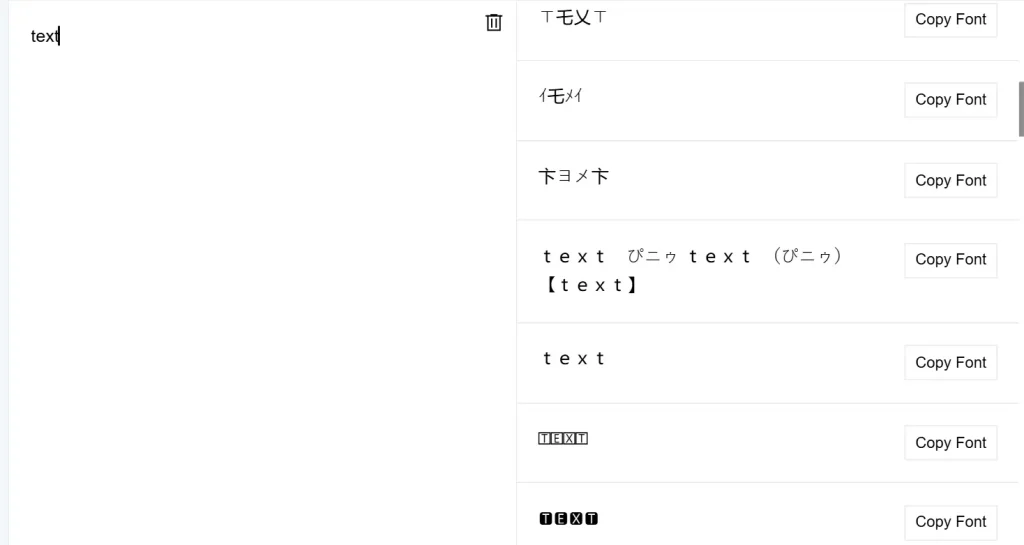
At its core, a weird text generator is a converter. You type or paste your normal text into an input box, and the tool transforms it using unicode symbols, diacritic marks, and special characters that look like fonts but aren’t really fonts.
That’s an important detail. These tools don’t install new fonts on your device. They replace letters with visually similar unicode characters from different alphabets and symbol sets. That’s why you can copy and paste the generated text almost anywhere.
In the second paragraph of most tools, you’ll notice references to style-based generators like brat generator, which focus more on attitude and tone than readability. It’s a different flavor, but the idea is the same: turn ordinary text into something eye-catching.
How Weird Fonts Are Created (Without Installing Anything)
People often ask, “Is this a font?” Short answer: no.
A weird font generator uses unicode characters that resemble letters. For example, the alphabet you see might actually be made from Greek, Cyrillic, or mathematical symbols. That’s why the text works across platforms. Some generators let you pick a brat generator color style, while others focus on glitch effects or zalgo text. Each version pulls from a different unicode block. This approach keeps things simple:
- No downloads
- No font installation
- Just copy and paste
- And yes, it works in real time.
Common Types of Weird Text You’ll See
Not all weird text looks the same. Some styles are subtle, others are unreadable on purpose.
1. Glitch and Zalgo Text
Zalgo text stacks diacritic marks above and below letters, creating a glitchy, broken look. It’s dramatic, chaotic, and not great for long messagesbut perfect for horror vibes or memes.
2. Fancy and Stylish Fonts
These use smoother unicode characters that look like cursive or bold fonts. People use them in bios, usernames, and captions where readability still matters.
3. Symbol-Based Text
This style swaps letters with symbols and strange marks. You’ll see arrows, stars, and odd shapes mixed into the text.
4. Weird Hacky Text
This one leans into randomness. Strange spacing, odd characters, and glitchy patterns that feel intentionally broken.
Each weird text converter usually includes several of these styles in one generator tool.
How to Generate Weird Text (Step by Step)
Using a weird text generator tool is straightforward, even if you’ve never touched one before.
- Type or paste your plain text into the input box
- Scroll through the generated text styles
- Pick the one that fits your mood
- Copy and paste it where you want
That’s it. No sign-up. No setup. No learning curve.
Most tools work online, making them easy to use on mobile or desktop.
Where People Actually Use Weird Text
This isn’t just a gimmick. People use weird text in real places, every day.
- Social media bios on Instagram, TikTok, and Twitter
- Discord usernames and chat messages
- WhatsApp messages for emphasis or jokes
- YouTube comment sections to stand out
- Gaming profiles and nicknames
I’ve even seen weird symbols used in email subject lines though that’s a risky move.
Weird Text vs Normal Text: When to Use It
There’s a time for weird text, and there’s a time for normal text.
Weird text works best when:
- You want attention
- The message is short
- Style matters more than clarity
Normal text wins when:
- You need readability
- You’re writing long messages
- Accessibility matters
Using a weird text generator doesn’t mean replacing regular writing. It’s more like adding spice. Too much ruins the dish.
Platforms That Support Weird Text (And Ones That Don’t)
Most platforms support unicode characters, but not all handle them equally.
Works well on:
- TikTok
- Discord
Can be inconsistent on:
- Some older Android apps
- SMS messages
- Certain websites with strict filters
Before setting a weird font as your main profile name, it’s smart to test it.
Is Weird Text Safe to Use?
This question comes up a lot, and it’s fair.
Using a weird text generator is generally safe. You’re not downloading files or running scripts. You’re just copying text characters.
That said, a few things to keep in mind:
- Avoid generators that ask for permissions
- Don’t paste weird text into sensitive forms
- Some platforms may flag excessive symbols
Used responsibly, there’s no real risk.
Pros and Cons of Using a Weird Text Generator
Pros
- Makes text stand out
- Works without installing fonts
- Easy copy and paste
- Free to use
- Compatible across platforms
Cons
- Can hurt readability
- Not all platforms display it the same
- Overuse looks spammy
- Some styles break accessibility
Like most tools, it’s about how you use it.
Weird Text for Bios, Profiles, and Usernames
This is where weird text shines.
A short bio with fancy text or weird letters can instantly separate your profile from hundreds of others. Many people use a weird letter generator just for usernames, especially on gaming platforms and chat apps.
One thing to watch out for: some systems don’t allow special characters in usernames. Always test before committing.
Zalgo, Unicode, and the Technical Side (Simple Version)
Unicode is the backbone of weird text. It’s a global standard that includes thousands of characters from different languages and symbol sets. Zalgo text pushes unicode to its limits by stacking diacritic marks. That’s why it looks glitchy and broken. This isn’t hacking. It’s just creative use of characters and symbols that already exist.
Can Weird Text Affect SEO or Search?
Yes—and not in a good way. Search engines prefer normal text. Using weird characters in titles, URLs, or main content can confuse crawlers. That’s why weird text is best kept for:
- Social posts
- Bios
- Comments
- Decorative elements
For articles, blogs, and product pages, stick to readable text.
Frequently Asked Question
Final Thoughts on Using a Weird Text Generator
A Weird Text Generator isn’t about replacing good writing. It’s about adding personality where plain text feels dull. Used sparingly, it can make bios pop, messages stand out, and profiles feel more personal. The trick is balance. Use weird text when style matters. Switch back to normal text when clarity counts. If you treat it like a tool not a crutch it does exactly what it promises: makes your text hard to ignore.